

Inverter Digital Quantity: A Comprehensive Technical Guide
1. Basic Concepts of Digital Quantity
1.1 What is Digital Quantity
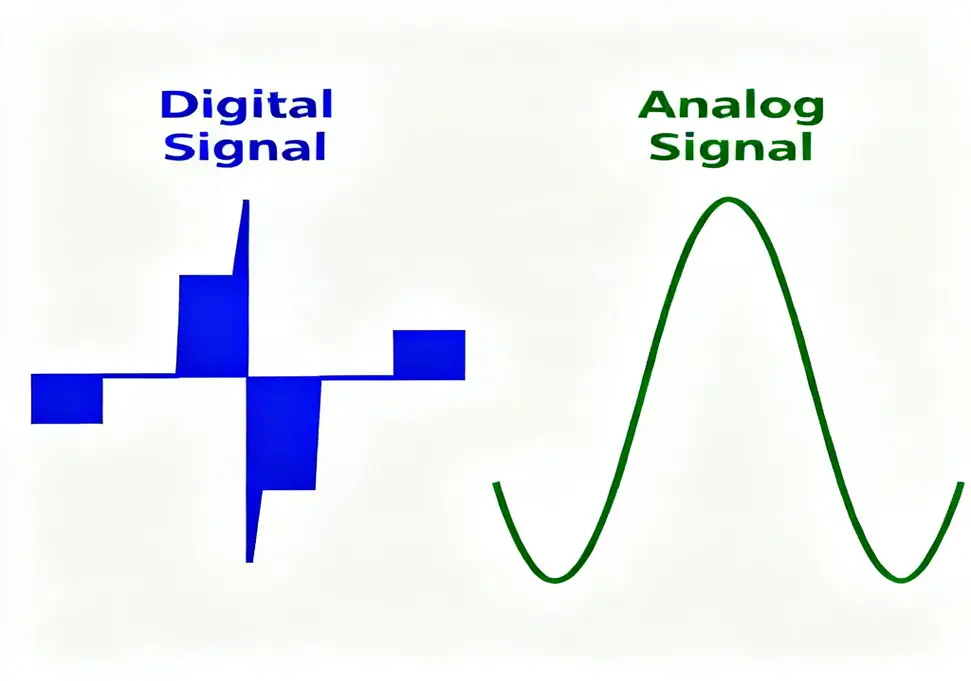
Digital quantity, also known as discrete quantity or switching quantity, refers to signals that are discrete in both time and amplitude. In industrial automation, digital signals are typically represented using binary values (0 and 1) to indicate two distinct states.
Characteristics of Digital Quantity:
- Discreteness: The signal has only two states with no intermediate transition state
- Strong anti-interference ability: Digital signals are not easily affected by electromagnetic interference
- High precision: Digital signal transmission and processing have high precision
- Easy to process: Suitable for processing by computers and microprocessors
1.2 Digital Quantity in Daily Life
In daily life, we often encounter examples of digital quantities:
- Light switch: Either on (bright) or off (dark)
- Water tap: Either open (with water) or closed (without water)
- Doorbell button: Pressed (with signal) or released (without signal)
These devices all have only two states, no intermediate states, which is the typical characteristic of digital quantities.
2. Inverter Digital Input (DI)
2.1 Definition of Digital Input
Digital Input (DI) serves as the interface through which inverters receive external switching signals. These signals typically originate from external devices including buttons, switches, sensors, or Programmable Logic Controllers (PLCs).
2.2 Digital Input Terminals
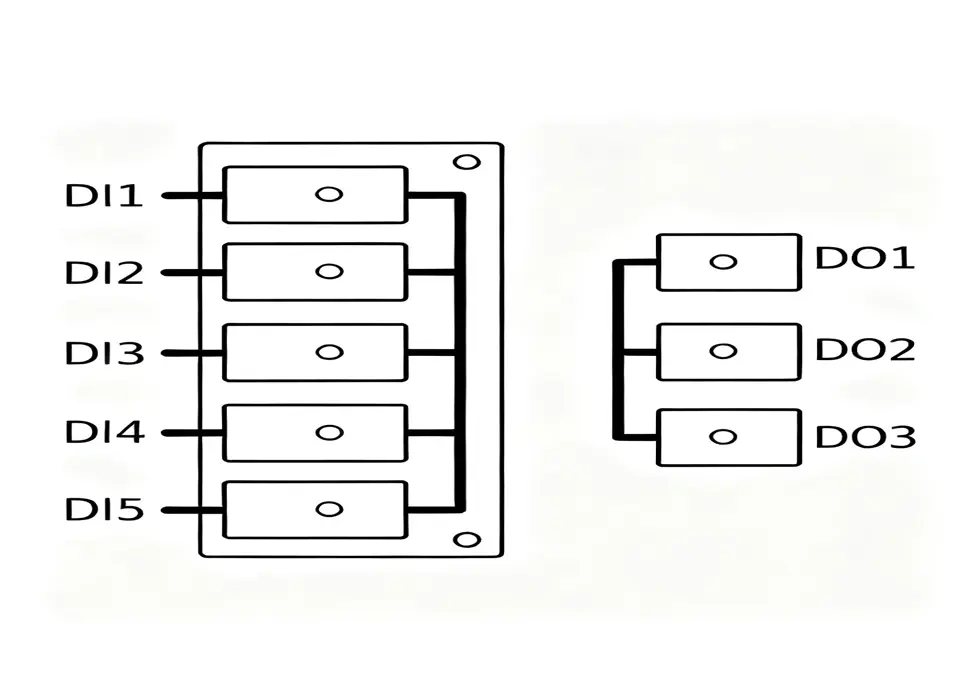
Inverters usually provide multiple digital input terminals, with common identifiers including:
- DI1, DI2, DI3… (Digital Input)
- X0, X1, X2…
- S0, S1, S2…
- MI1, MI2, MI3… (Multi-function Input)
**
2.3 Functions of Digital Input
Digital input terminals can achieve multiple functions through parameter settings:
Basic Control Functions:
- Start/Stop Control: Control the start and stop of the inverter through external buttons
- Forward/Reverse Control: Control the forward and reverse rotation of the motor through different input terminals
- Jog Control: Realize jog operation of the motor
Speed Control Functions:
- Multi-speed Control: Realize preset speed switching through combination of different terminals
- Speed Up/Down: Realize continuous speed adjustment through terminal signals
- Skip Frequency: Skip the resonance frequency of the motor
Protection and Auxiliary Functions:
- Fault Reset: Clear the fault state of the inverter
- Emergency Stop: Receive emergency stop signal and immediately stop inverter output
- External Fault Input: Receive fault signals from external equipment
2.4 Parameter Setting of Digital Input
Taking Siemens MM440 inverter as an example, parameter settings for digital input:
|
Parameter No.
|
Parameter Function
|
Setting Value
|
Description
|
|
P0700
|
Select command source
|
2
|
Digital input control
|
|
P0701
|
DI1 function
|
1
|
Start/Stop
|
|
P0702
|
DI2 function
|
2
|
Forward/Reverse
|
|
P0703
|
DI3 function
|
9
|
Fault reset
|
|
P0704
|
DI4 function
|
15
|
Multi-speed selection
|
2.5 Wiring Methods for Digital Input
Wiring Principles:
- All digital input terminals require a common terminal (COM)
- Input signals are usually DC 24V
- Pay attention to polarity when wiring (some inverters support non-polar input)
Typical Wiring Method:
External Button +24V —-+—- Button —-+—- DI1
| |
| |
+—- COM —–+
3. Inverter Digital Output (DO)
3.1 Definition of Digital Output
Digital Output (DO) functions as the interface through which inverters transmit status signals to external devices. These signals provide real-time information about the inverter’s current operational status.
3.2 Types of Digital Output
Inverter digital outputs usually have two types:
Relay Output:
- Characteristics: Passive contacts, large capacity, can directly drive AC220V equipment
- Identification: TA, TB, TC (SPDT relay, TA-TB normally open, TB-TC normally closed)
- Applications: Driving indicator lights, contactor coils, alarms, etc.
Transistor Output:
- Characteristics: Active output, fast response, small capacity
- Identification: DO1, DO2, DO3…
- Applications: Connecting to PLC inputs, high-speed counting, etc.
3.3 Functions of Digital Output
Digital outputs can reflect various states of the inverter:
Operation Status Output:
- Running: Inverter is outputting voltage and frequency
- Stopped: Inverter is in stopped state
- Forward/Reverse Indication: Indicate the rotation direction of the motor
Fault Status Output:
- Fault Alarm: Inverter detects a fault
- Overload Alarm: Motor or inverter overload
- Overvoltage/Undervoltage Alarm: Power supply voltage abnormality
Control Status Output:
- Frequency Reached: Output frequency reaches set value
- Current Limit: Output current reaches limit value
- PID Feedback: PID control feedback signal
3.4 Parameter Setting of Digital Output
Taking Siemens MM440 inverter as an example, parameter settings for digital output:
|
Parameter No.
|
Parameter Function
|
Setting Value
|
Description
|
|
P0731
|
DO1 function
|
52.3
|
Fault output
|
|
P0732
|
DO2 function
|
52.2
|
Running output
|
|
P0733
|
DO3 function
|
52.1
|
Frequency reached
|
|
P0748
|
Output inversion
|
0
|
Normal output
|
4. Difference Between Digital and Analog Quantities
4.1 Signal Characteristic Comparison
|
Characteristic
|
Digital Quantity
|
Analog Quantity
|
|
Signal Form
|
Discrete signal, square wave
|
Continuous signal, sine wave
|
|
Value Range
|
Only two states: 0 and 1
|
Continuously changing within a certain range
|
|
Precision
|
High precision, not easily distorted
|
Relatively low precision, susceptible to interference
|
|
Anti-interference
|
Strong anti-interference ability
|
Weak anti-interference ability
|
|
Transmission Distance
|
Suitable for long-distance transmission
|
Suitable for short-distance transmission
|
|
Processing Method
|
Suitable for digital circuit processing
|
Requires A/D conversion for processing
|
4.2 Application Scenario Comparison
Application Scenarios for Digital Quantity:
- Occasions requiring precise control
- Long-distance signal transmission
- Detection and control of switching states
- Logic operations and program control
Application Scenarios for Analog Quantity:
- Occasions requiring continuous adjustment
- Short-distance signal transmission
- Detection of continuous physical quantities such as temperature, pressure, flow
- Continuous control of speed, torque, etc.
4.3 Applications in Inverters
In inverters, digital and analog quantities are usually used together:
- Digital Quantity: Used for logic control such as start-stop control, forward-reverse, multi-speed
- Analog Quantity: Used for continuous control such as speed reference, frequency adjustment
5. Wiring Methods and Application Scenarios
5.1 Digital Connection Between Inverter and PLC
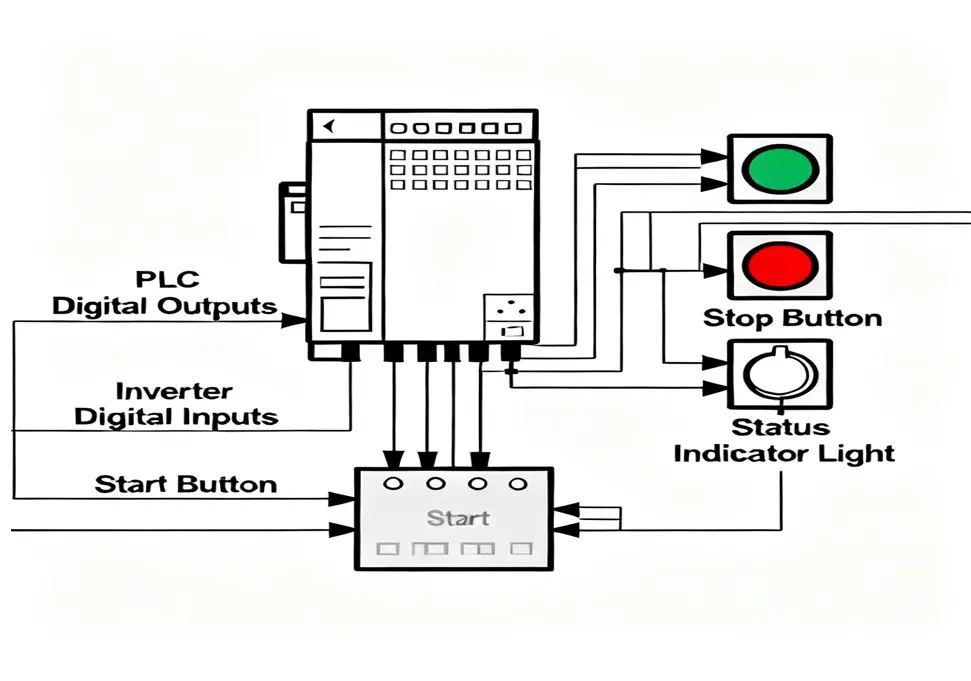
The digital communication interface between inverters and PLCs represents one of the most prevalent integration methods in modern industrial automation systems.
**
Connection Principles:
- PLC digital outputs connect to inverter digital inputs
- Inverter digital outputs connect to PLC digital inputs
- Pay attention to signal polarity and voltage level matching
Typical Connection Scheme:
PLC Output +24V —-+—- PLC DO1 —-+—- Inverter DI1 (Start)
+—- PLC DO2 —-+—- Inverter DI2 (Forward)
+—- PLC DO3 —-+—- Inverter DI3 (Reverse)
+—- COM ——–+—- Inverter COM
5.2 Wiring and Setting for Multi-speed Control
Multi-speed control is an important application of digital input:
Wiring Method:
+24V —-+—- Switch1 —-+—- DI1
+—- Switch2 —-+—- DI2
+—- Switch3 —-+—- DI3
+—- COM ——–+—- COM
Parameter Settings:
|
Parameter No.
|
Parameter Function
|
Setting Value
|
Description
|
|
P0701
|
DI1 function
|
15
|
Multi-speed selection bit 0
|
|
P0702
|
DI2 function
|
15
|
Multi-speed selection bit 1
|
|
P0703
|
DI3 function
|
15
|
Multi-speed selection bit 2
|
|
P1000
|
Frequency setting source
|
3
|
Multi-speed setting
|
|
P1001
|
First speed
|
50.0
|
50Hz
|
|
P1002
|
Second speed
|
30.0
|
30Hz
|
|
P1003
|
Third speed
|
15.0
|
15Hz
|
Speed Combination Table:
|
DI1
|
DI2
|
DI3
|
Selected Speed
|
Frequency
|
|
0
|
0
|
0
|
Basic frequency
|
50Hz
|
|
1
|
0
|
0
|
First speed
|
50Hz
|
|
0
|
1
|
0
|
Second speed
|
30Hz
|
|
1
|
1
|
0
|
Third speed
|
15Hz
|
|
0
|
0
|
1
|
Fourth speed
|
10Hz
|
5.3 Wiring for Fault Alarm Output
Relay Output Wiring:
+220V —-+—- TA —-+—- Fault Indicator —-+—- 0V
+—- TB —-+ |
+—- TC ——————————+
Transistor Output Wiring:
+24V —-+—- Indicator —-+—- DO1 —-+—- COM
+—- Current Limiting Resistor —-+
6. Common Problems and Troubleshooting
6.1 Common Problems with Digital Input
Problem 1: No response from digital input
Possible Causes:
- Incorrect wiring or poor contact
- Abnormal power supply voltage
- Incorrect parameter settings
- Damaged input terminal
Troubleshooting Methods:
- Check if wiring is correct and ensure terminal connections are secure
- Measure if input voltage is within specified range (usually DC 24V±10%)
- Check if relevant parameter settings are correct
- Measure the on-off status of terminals with a multimeter
Problem 2: Digital input malfunctions
Possible Causes:
- Input signal interference
- Excessively long wiring or unreasonable routing
- No appropriate filtering time set
- External equipment failure
Troubleshooting Methods:
- Check for electromagnetic interference sources
- Optimize wiring, avoid parallel routing with power lines
- Increase input filtering time (e.g., parameter P0724)
- Check if external equipment is working normally
6.2 Common Problems with Digital Output
Problem 1: No signal from digital output
Possible Causes:
- Incorrect parameter settings
- Damaged output terminal
- Excessive external load
- Internal inverter failure
Troubleshooting Methods:
- Check output function parameter settings
- Measure the voltage of output terminals
- Check if external load is within specified range
- Check if the inverter has fault codes
Problem 2: Relay output contact sticking
Possible Causes:
- Excessive load current
- Frequent switching operations
- Contact aging
- Overvoltage surge
Troubleshooting Methods:
- Check if load current exceeds rated contact current
- Reduce unnecessary switching operations
- Replace aging relays
- Connect RC snubber circuit in parallel across inductive loads
6.3 Common Wiring Problems
Problem 1: Confusion between COM terminal and GND terminal
Explanation:
- COM terminal is the common terminal for digital input
- GND terminal is the ground terminal for analog signals
- They cannot be mixed
Correct Practices:
- Use COM terminal for digital input signals
- Use GND terminal for analog signals
- Ensure two common terminals are independent of each other
Problem 2: Signal wires mixed with power wires
Hazards:
- Electromagnetic interference causing signal distortion
- May cause equipment malfunctions
- Affect system stability
Correct Practices:
- Separate routing of signal wires and power wires
- Maintain a distance of at least 10cm
- Use shielded cables and properly ground them
- Avoid parallel routing
6.4 Common Parameter Setting Problems
Problem 1: Parameters not taking effect after setting
Possible Causes:
- Parameters not saved after setting
- Inverter restart required to take effect
- Conflicting parameter settings
- Parameter access level restrictions
Solutions:
- Confirm parameters are saved after setting by pressing the save button
- Restart the inverter to make parameters take effect
- Check settings of related parameters
- Confirm parameter access permissions
Problem 2: Cannot switch between multi-speeds after setting
Possible Causes:
- Incorrect frequency setting source selection
- Incorrect multi-speed parameter settings
- Incorrect digital input function settings
- Incorrect terminal wiring
Solutions:
- Confirm frequency setting source (e.g., P1000=3)
- Check parameter settings for each speed stage
- Confirm digital input functions are set to multi-speed selection
- Check if terminal wiring is correct
Summary
Digital I/O functionality in inverters constitutes a critical component of modern industrial automation control systems. Through dedicated digital input and output interfaces, inverters establish reliable communication with external devices, enabling the implementation of sophisticated control algorithms and operational sequences.
Main Advantages of Digital Quantity:
- High Reliability: Digital signals have strong anti-interference ability and long transmission distance
- Good Flexibility: Multiple functions can be achieved through parameter settings
- Easy Integration: Convenient integration with PLC, DCS and other control systems
- Low Cost: Hardware cost of digital interfaces is relatively low
Application Points:
- Correctly understand the concepts and characteristics of digital quantity
- Master the wiring methods of digital input and output
- Familiar with setting and debugging of related parameters
- Pay attention to electromagnetic compatibility and system stability
- Establish complete fault diagnosis and maintenance mechanisms
By properly using the digital quantity functions of inverters, the automation level and reliability of industrial control systems can be greatly improved, providing strong support for production process optimization and energy saving.