

Inverter Analog Input/Output: A Complete Technical Guide for Industrial Automation
1. Basic Concepts of Analog Quantity
1.1 What is Analog Quantity
Analog signals refer to continuously varying electrical quantities that can take any value within a specified range. Unlike digital signals, which only have discrete values (typically 0 or 1), analog signals provide smooth, continuous representation of real-world physical phenomena such as temperature, pressure, and speed.
Characteristics of Analog Quantity:
- Continuity: Signals change smoothly without discrete steps
- Precision: Can represent small changes in physical quantities
- Real-world representation: Ideal for measuring natural phenomena
- Infinite resolution: Theoretically can represent any value within range

1.2 Analog Quantity in Daily Life
In our daily lives, we encounter numerous examples of analog quantities:
- Temperature: Changes continuously throughout the day
- Sound volume: Can be adjusted smoothly up or down
- Light intensity: Varies gradually from dark to bright
- Water flow: Can be adjusted to any level between fully open and closed
These natural phenomena change continuously, making analog signals the perfect way to represent them in electronic systems.
1.3 Standard Analog Signals
In industrial automation, standard analog signal ranges have been established for consistency:
Voltage Signals:
- 0-10V: Most common voltage range for analog inputs
- 0-5V: Used in some legacy systems
- ±10V: For applications requiring both positive and negative values
Current Signals:
- 0-20mA: Basic current loop standard
- 4-20mA: Most widely used (provides live zero for fault detection)
- 0-10mA: Older standard, less common today
The 4-20mA current loop standard is particularly popular in industrial applications due to several key advantages:
- Fault detection capability: The 4mA “live zero” allows detection of open-circuit faults
- Superior noise immunity: Current signals are less susceptible to electromagnetic interference than voltage signals
- Extended transmission distances: Can reliably transmit signals over hundreds of meters
- Simplified wiring: Requires only two wires for both power and signal transmission
2. Inverter Analog Input (AI)
2.1 Definition of Analog Input
Analog Input (AI) modules serve as the interface through which variable frequency drives (VFDs) receive continuous control signals from various industrial sensors, transmitters, potentiometers, or distributed control systems (DCS).
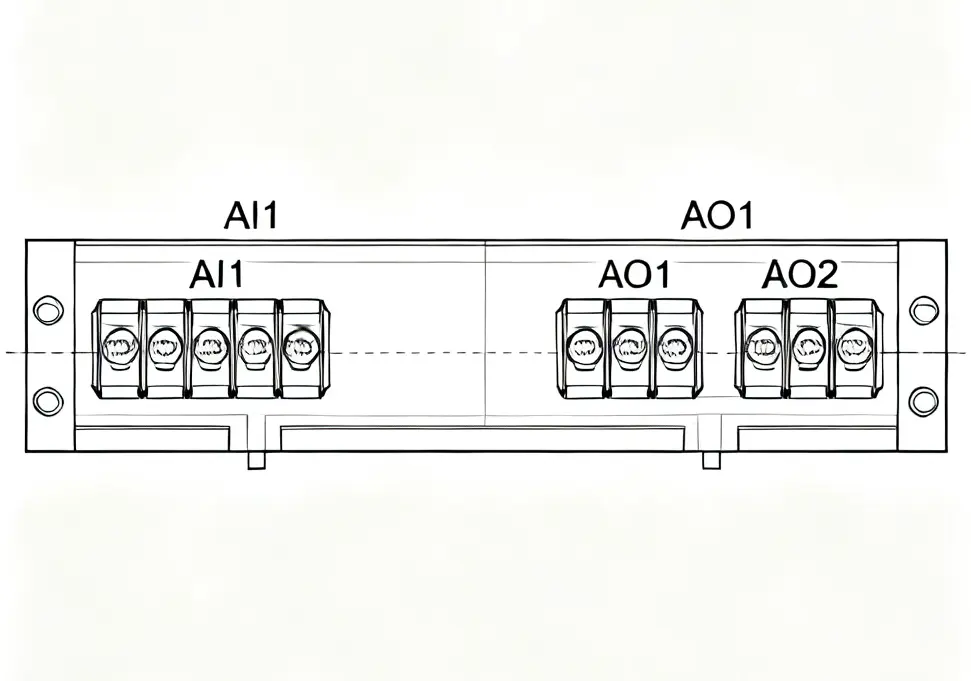
2.2 Analog Input Terminals
Inverters usually provide multiple analog input terminals, with common identifiers including:
- AI1, AI2, AI3… (Analog Input)
- AVI, ACI (Analog Voltage Input, Analog Current Input)
- VIN, IIN (Voltage Input, Current Input)
**
2.3 Analog Input Signal Types
Inverters can accept different types of analog input signals:
Voltage Inputs:
- 0-10V: Most common voltage input range
- 0-5V: Used in some specialized applications
- 1-5V: Provides live zero similar to 4-20mA current
Current Inputs:
- 0-20mA: Basic current input
- 4-20mA: Industry standard for process control
- 0-10mA: Older standard, still used in some systems
2.4 Functions of Analog Input
Analog inputs are primarily used for:
Speed Control:
- Frequency reference: The primary use of analog inputs is to set the inverter’s output frequency
- Speed adjustment: Allows continuous speed control from 0 to maximum frequency
- Ramp control: Can be used to adjust acceleration and deceleration times
Process Control:
- Pressure control: From pressure transmitters (4-20mA)
- Temperature control: From temperature sensors and transmitters
- Flow control: From flow meters and transmitters
- Level control: From level sensors
Advanced Control:
- Torque control: In torque control mode
- Position control: In some advanced inverter models
- PID control feedback: For closed-loop control systems
2.5 Parameter Setting for Analog Input
Taking Siemens MM440 inverter as an example, parameter settings for analog input:
|
Parameter No.
|
Parameter Function
|
Setting Value
|
Description
|
|
P0756
|
Analog input type
|
2
|
Current input (4-20mA)
|
|
P0757
|
Calibration X1 value
|
4
|
Minimum input = 4mA
|
|
P0758
|
Calibration Y1 value
|
0.0
|
Corresponding to 0% output
|
|
P0759
|
Calibration X2 value
|
20
|
Maximum input = 20mA
|
|
P0760
|
Calibration Y2 value
|
100.0
|
Corresponding to 100% output
|
|
P0761
|
Analog input deadband
|
4
|
Deadband = 4mA
|
|
P1000
|
Frequency setting source
|
2
|
Use analog input 1
|
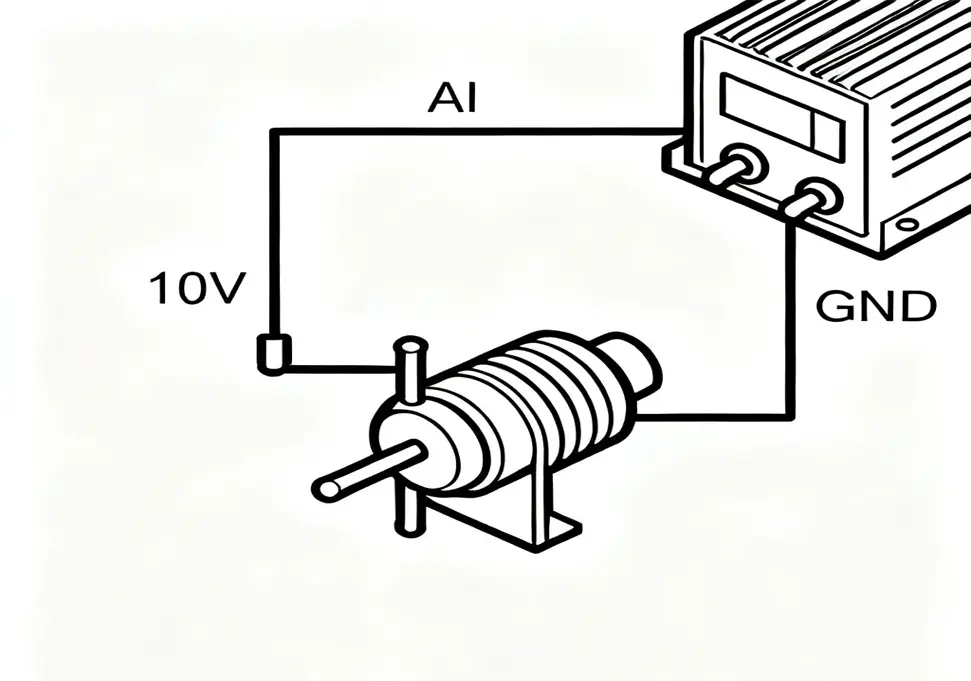
2.6 Analog Input Wiring Methods
Potentiometer Connection:
Inverter Potentiometer
10V ———– Terminal 1
AI1 ———– Terminal 2
GND ———– Terminal 3
**
4-20mA Current Loop Connection:
+24V —-+—- Transmitter —-+—- AI1 (Current Input)
| |
| |
+—- Inverter GND —-+
0-10V Voltage Signal Connection:
Signal Source Inverter
+ Output ——- AI1
– Output ——- GND
3. Inverter Analog Output (AO)
3.1 Definition of Analog Output
Analog Output (AO) functions as the interface through which inverters transmit continuous status signals to external devices. These signals provide real-time information about the inverter’s operational parameters.
3.2 Analog Output Signal Types
Inverters typically provide the following analog output types:
Voltage Outputs:
- 0-10V: Most common voltage output range
- 0-5V: Used in some specialized applications
Current Outputs:
- 0-20mA: Basic current output
- 4-20mA: Industry standard for process monitoring
3.3 Functions of Analog Output
Analog outputs can provide various operational parameters:
Basic Operating Parameters:
- Output frequency: Real-time frequency output (Hz)
- Output current: Actual current supplied to the motor (A)
- Output voltage: Voltage applied to the motor (V)
- Motor speed: Actual rotational speed (RPM)
Advanced Parameters:
- Torque: Output torque (Nm or % of rated)
- Power: Output power (kW)
- DC bus voltage: Internal DC voltage level
- Temperature: Inverter or motor temperature (°C)
Control Signals:
- PID feedback: Process variable for closed-loop control
- Reference signal: Actual reference value being used
- Load current: Motor load current
- Speed feedback: From encoder or sensor
3.4 Parameter Setting for Analog Output
Taking Siemens MM440 inverter as an example, parameter settings for analog output:
|
Parameter No.
|
Parameter Function
|
Setting Value
|
Description
|
|
P0771
|
Analog output function
|
21
|
Output frequency
|
|
P0777
|
Calibration X1 value
|
0.0
|
0% corresponds to
|
|
P0778
|
Calibration Y1 value
|
4
|
4mA output
|
|
P0779
|
Calibration X2 value
|
100.0
|
100% corresponds to
|
|
P0780
|
Calibration Y2 value
|
20
|
20mA output
|
|
P2000
|
Base frequency
|
50.0
|
100% = 50Hz
|
3.5 Analog Output Applications
Monitoring Systems:
- Panel meters: For local display of parameters
- Chart recorders: For historical data recording
- Data acquisition systems: For process monitoring
- SCADA systems: For remote monitoring and control
Control Systems:
- PLC analog inputs: For integration with control systems
- DCS systems: Distributed control systems
- HMI interfaces: Human-machine interfaces
- PID controllers: For closed-loop control
4. Analog Quantity Calibration
4.1 What is Analog Calibration
Analog calibration is the critical process of establishing a precise linear relationship between analog signal values and the physical quantities they represent. Proper calibration ensures accurate measurement, reliable control, and consistent performance across industrial automation systems.
4.2 Calibration Principles
Analog calibration uses a two-point method to define a linear relationship:
- Point 1 (X1, Y1): Minimum input/output value
- Point 2 (X2, Y2): Maximum input/output value
The relationship is defined by the linear equation:
Y = mX + b
Where:
- Y: Physical quantity (frequency, current, etc.)
- X: Analog signal value (voltage or current)
- m: Slope of the line
- b: Y-intercept
4.3 Input Calibration Example
Example: 4-20mA input for 0-50Hz frequency control
Given:
- X1 = 4mA, Y1 = 0Hz
- X2 = 20mA, Y2 = 50Hz
Calculations:
Slope (m) = (Y2 – Y1) / (X2 – X1) = (50 – 0) / (20 – 4) = 50 / 16 = 3.125
Intercept (b) = Y1 – mX1 = 0 – (3.125 × 4) = -12.5
Equation: Y = 3.125X – 12.5
Verification:
- At 4mA: Y = (3.125 × 4) – 12.5 = 12.5 – 12.5 = 0Hz ✓
- At 12mA: Y = (3.125 × 12) – 12.5 = 37.5 – 12.5 = 25Hz ✓
- At 20mA: Y = (3.125 × 20) – 12.5 = 62.5 – 12.5 = 50Hz ✓
4.4 Output Calibration Example
Example: 0-20mA output for 0-100A current monitoring
Given:
- X1 = 0A, Y1 = 0mA
- X2 = 100A, Y2 = 20mA
Calculations:
Slope (m) = (Y2 – Y1) / (X2 – X1) = (20 – 0) / (100 – 0) = 20 / 100 = 0.2
Intercept (b) = Y1 – mX1 = 0 – (0.2 × 0) = 0
Equation: Y = 0.2X
Verification:
- At 0A: Y = 0.2 × 0 = 0mA ✓
- At 50A: Y = 0.2 × 50 = 10mA ✓
- At 100A: Y = 0.2 × 100 = 20mA ✓
4.5 Base Parameters
Inverters use base parameters to define what 100% represents for different quantities:
|
Parameter
|
Description
|
Typical Value
|
|
P2000
|
Base frequency
|
50Hz or 60Hz
|
|
P2001
|
Base voltage
|
1000V
|
|
P2002
|
Base current
|
2 × rated current
|
|
P2003
|
Base torque
|
2 × rated torque
|
These base parameters allow the same analog scaling to be used for different motor sizes.
5. Difference Between Analog and Digital Quantities
5.1 Fundamental Differences
|
Characteristic
|
Analog Quantity
|
Digital Quantity
|
|
Signal Form
|
Continuous waveform
|
Discrete pulses (square wave)
|
|
Values
|
Infinite within range
|
Finite (usually binary 0/1)
|
|
Resolution
|
Theoretically infinite
|
Limited by bit depth
|
|
Accuracy
|
Affected by noise and drift
|
High accuracy with error checking
|
|
Noise Immunity
|
Low (susceptible to interference)
|
High (digital signals can be regenerated)
|
|
Transmission Distance
|
Short to medium
|
Long distances possible
|
|
Processing
|
Analog circuits
|
Digital processors and software
|
5.2 Application Comparison
When to Use Analog Signals:
- Continuous control: Where smooth, continuous adjustment is needed
- Simple systems: Basic control without complex logic
- Short distances: Within a single control panel or machine
- Cost-sensitive applications: Lower cost for simple applications
When to Use Digital Signals:
- Precise control: Where accuracy and repeatability are critical
- Complex logic: When sophisticated control algorithms are needed
- Long distances: Factory-wide or remote control
- Communication: Networked systems and data exchange
5.3 Complementary Applications
In modern industrial systems, analog and digital signals often work together:
Analog-to-Digital Conversion (ADC):
- Analog sensors convert physical quantities to electrical signals
- ADC converts analog signals to digital for processing
- Digital processor performs calculations and logic
- DAC converts digital signals back to analog for control
Hybrid Control Systems:
- Analog inputs: For sensors and process variables
- Digital processing: For control algorithms and logic
- Analog outputs: For actuators and final control elements
6. Wiring Methods and Application Scenarios
6.1 Proper Wiring Practices
Shielding:
- Use shielded cables for analog signals
- Ground shields at one end only (preferably at the signal source)
- Keep shield connections clean and tight
Routing:
- Separate analog signal wires from power wires
- Maintain minimum distance of 10-15cm from power cables
- Avoid parallel routing with power conductors
- Cross power cables at 90° angles if necessary
Termination:
- Use proper terminal blocks and connectors
- Ensure secure, low-resistance connections
- Use twisted-pair cables for differential signals
- Add surge protection for long runs
6.2 4-20mA Current Loop Wiring
Two-Wire Transmitters:
Power Supply Transmitter Inverter
+24V —-+—-+ +—-+—- AI1
| | | |
| | | |
+—-+ +—-+—- GND
Three-Wire Transmitters:
Power Supply Transmitter Inverter
+24V —-+—-+ V+ +—-+—- AI1
| | | |
| | 4-20mA | |
+—-+—-+ +—-+—- GND
|
|
+———— GND
6.3 Typical Application Scenarios
Pump Control:
- Pressure sensor (4-20mA) → Inverter AI → Motor speed control
- Maintains constant pressure in water supply systems
- Energy savings through variable speed operation
Fan Control:
- Temperature sensor → Inverter AI → Fan speed adjustment
- Maintains constant temperature in HVAC systems
- Reduces energy consumption compared to on/off control
Conveyor Speed Control:
- Potentiometer → Inverter AI → Conveyor speed adjustment
- Allows operator to adjust speed for different products
- Smooth acceleration and deceleration
Process Control:
- Flow meter (4-20mA) → Inverter AI → Pump speed control
- Maintains constant flow rate in chemical processes
- Integrates with PLC for automated process control
6.4 System Integration Examples
Simple Standalone System:
Potentiometer → Inverter AI → Motor
|
→ Inverter AO → Panel Meter (frequency display)
PLC-Integrated System:
Sensors → PLC AI → PLC Processor → PLC AO → Inverter AI → Motor
|
→ PLC DO → Inverter DI (start/stop)
Distributed Control System:
Field Sensors → Remote I/O → Network → DCS → Inverter → Actuators
|
→ HMI (Operator Interface)
7. Common Problems and Troubleshooting
7.1 Signal Quality Issues
Problem: Noisy Analog Signal
Symptoms:
- Fluctuating display readings
- Unstable motor speed
- Jerky or erratic operation
Possible Causes:
- Poor shielding or grounding
- Signal wires too close to power cables
- Loose connections
- Electrical interference from nearby equipment
Solutions:
- Check and improve shielding
- Increase distance from power sources
- Tighten all connections
- Add signal conditioning or filtering
- Use twisted-pair cables
Problem: Signal Drift
Symptoms:
- Gradual change in output without input change
- Need for frequent recalibration
- Temperature-dependent errors
Possible Causes:
- Temperature changes affecting components
- Aging of electronic components
- Poor quality or damaged sensors
- Power supply voltage variations
Solutions:
- Check environmental conditions
- Verify power supply stability
- Replace aging components
- Use temperature-compensated sensors
- Implement periodic calibration
7.2 Calibration Problems
Problem: Incorrect Calibration
Symptoms:
- Output does not match expected values
- Full-scale or zero errors
- Non-linear response
Possible Causes:
- Incorrect parameter settings
- Wrong calibration values entered
- Damaged analog input/output circuits
- Sensor or transmitter issues
Solutions:
- Verify all parameter settings
- Reperform calibration procedure
- Check for linearity errors
- Test with known reference signals
- Verify sensor/transmitter calibration
Problem: Hysteresis or Deadband
Symptoms:
- Different outputs for same input (rising vs falling)
- Unresponsive to small input changes
- “Sticking” at certain values
Possible Causes:
- Excessive deadband settings
- Mechanical friction in potentiometers
- Damaged or worn components
- Poor contact in wiring
Solutions:
- Adjust deadband parameters
- Clean or replace potentiometers
- Check for mechanical binding
- Improve wiring connections
- Add signal conditioning
7.3 Wiring and Connection Issues
Problem: Open Circuit in 4-20mA Loop
Symptoms:
- Zero or minimum output
- Fault indication for current loop
- No response to input changes
Possible Causes:
- Broken wire in current loop
- Loose or disconnected terminal
- Failed transmitter or sensor
- Blown fuse in loop power supply
Solutions:
- Check continuity of all wires
- Inspect and tighten all connections
- Verify power supply to transmitter
- Test transmitter with known input
- Replace faulty components
Problem: Ground Loop Interference
Symptoms:
- Unstable readings
- Noise on analog signals
- Different readings with different ground connections
Possible Causes:
- Multiple ground points at different potentials
- Ground loops formed by wiring
- Poor grounding practices
- Differences in ground potential between equipment
Solutions:
- Ensure single-point grounding
- Isolate ground loops using isolators
- Use differential input configurations
- Improve overall grounding system
- Add isolation transformers if necessary
7.4 Equipment-Specific Issues
Problem: Inverter Not Responding to Analog Input
Symptoms:
- No change in output frequency
- Inverter ignores analog input
- Default frequency used instead
Possible Causes:
- Incorrect frequency source selection
- Analog input disabled in parameters
- Faulty analog input circuit
- Incorrect wiring of analog input
Solutions:
- Check frequency source parameter (e.g., P1000)
- Verify analog input is enabled
- Test analog input with known signal
- Check wiring against manufacturer’s diagram
- Verify power supply to analog circuits
Problem: Analog Output Not Working
Symptoms:
- No signal at analog output terminals
- Incorrect values displayed on instruments
- Output remains at zero or maximum
Possible Causes:
- Incorrect output function selection
- Faulty analog output circuit
- Incorrect wiring to external instruments
- Overload or short circuit on output
Solutions:
- Verify output function parameter (e.g., P0771)
- Test output with multimeter
- Check wiring to external equipment
- Verify load is within specifications
- Check for short circuits in wiring
Summary
Analog quantity plays a crucial role in industrial automation, providing the means to interface between the continuous physical world and digital control systems. Understanding how to properly use and configure analog inputs and outputs in inverters is essential for achieving accurate and reliable control.
Key Points:
- Analog signals provide continuous control and are ideal for representing real-world physical quantities
- Proper calibration ensures accurate conversion between analog signals and physical parameters
- Correct wiring practices are essential for maintaining signal integrity and minimizing noise
- Troubleshooting skills are necessary to identify and resolve common issues with analog systems
- Integration of analog and digital technologies provides the best solution for modern control systems
By mastering the concepts and techniques presented in this guide, engineers and technicians can effectively design, implement, and maintain inverter-based control systems using analog signals.