

11/03/2025
How to Prevent and Fix Inverter Overheating in Summer: Complete Guide High temperatures in summer are one of the main causes of inverter failures. Studies have shown that for every 10°C increase in ambient temperature, the service life of an inverter is halved while the failure rate rises sharply. This comprehensive guide will detail the causes, solutions, and preventive measures for inverter overheating to help you keep your equipment running smoothly during hot weather. I. Understanding Inverter Overheating Causes 1. Excessive Ambient Temperature Impact Mechanism: Electronic components inside the inverter generate significant heat during operation, especially IGBT modules which produce more heat at high frequencies Temperature Threshold: Standard operating temperature range is -10°C to 40°C; derating is required above 40°C Accelerated Aging: High temperatures accelerate insulation material aging, reduce semiconductor device performance, and shorten capacitor lifespan 2. Poor Ventilation and Heat Dissipation Air Duct Blockage: Foreign objects like dust and cotton lint block heat sinks and air ducts Improper Installation: Insufficient surrounding space and inadequate heat dissipation distance Cabinet Design: Unreasonable control cabinet ventilation design that fails to effectively exhaust hot air 3. Cooling System Failure Fan Issues: Fan jamming, damage, or power cord detachment Fan Lifespan: Typical fan lifespan in industrial environments is 20,000-30,000 hours, which shortens in high-temperature environments Heat Sink Problems: Heat sink dust accumulation or thermistor damage 4. Overloading Issues Overload Operation: Actual load exceeds the inverter’s rated capacity Excessive Current: Excessive current generates significant heat, triggering overheat protection Improper Sizing: “Oversized load for undersized inverter” situation, where the inverter is not properly matched to the load requirements 5. Other Contributing Factors Power Grid Harmonics: Harmonic interference due to lack of reactor installation Parameter Settings: Excessively high carrier frequency increases power losses Component Aging: Performance degradation due to aging components like capacitors and semiconductors II. Emergency...
Details
11/03/2025
How to Properly Set Inverter Acceleration and Deceleration Times: A Comprehensive Guide If you’re working with industrial inverters, understanding how to set acceleration and deceleration times correctly is crucial for equipment performance, safety, and longevity. This expert guide will walk you through the entire process, from basic concepts to advanced optimization techniques. Understanding Acceleration and Deceleration Times Acceleration time refers to the duration required for the inverter output frequency to increase from 0Hz to the maximum operating frequency (typically 50Hz or 60Hz). Deceleration time is the time needed for the frequency to decrease from maximum back to 0Hz. These parameters control how smoothly your motor transitions between speed changes, directly impacting: Mechanical stress on equipment Energy consumption Production efficiency System reliability Consequences of Improper Settings Too Short Acceleration Time Excessive inrush current that may trigger overcurrent protection Increased mechanical stress on motor and transmission components Higher energy consumption during startup Potential equipment damage from shock loads Reduced component lifespan due to frequent stress Too Short Deceleration Time Regenerative energy overload causing DC bus overvoltage Unstable stopping or excessive coasting distance Increased mechanical vibration and noise Need for additional braking components Risk of damage to sensitive equipment Proper Setting Principles Setting Based on Load Characteristics Load Type Recommended Acceleration Time Recommended Deceleration Time Typical Applications Key Considerations Light Load 5-15 seconds 10-20 seconds Fans, pumps, air compressors Avoid insufficient starting torque Medium Load 10-30 seconds 15-35 seconds Conveyors, mixers, small machines Prevent material slippage Heavy Load 20-60+ seconds 25-50+ seconds Cranes, machine tools, extruders Minimize mechanical shock Setting Based on Motor Power Requirements Motor Power Range Suggested Acceleration Time Suggested Deceleration Time Small (<5.5kW) 5-15 seconds 8-20 seconds Medium (5.5-37kW) 10-30 seconds 15-35 seconds Large (>37kW) 20-60 seconds 25-50 seconds Step-by-Step Commissioning Process Phase 1: Initial Setup and Preparation Safety First...
Details
11/03/2025
Inverter SC Fault Code Troubleshooting Guide: How to Fix Short Circuit Issues If your inverter is displaying an SC fault code, it means the device has detected a short circuit condition. This comprehensive guide will help you diagnose and resolve SC faults in industrial inverters, ensuring safe and effective troubleshooting. Understanding Inverter SC Fault Codes SC stands for Short Circuit, indicating that the inverter has detected an abnormal current flow caused by a short circuit. Different manufacturers may use variations: SC1: Output short circuit (hardware detection) SC2: Impedance short circuit (software detection) SC3: Ground fault or earth leakage These fault codes are critical safety mechanisms designed to protect the inverter and connected equipment from damage. Common Causes of Inverter SC Faults Electrical Connection Issues Motor winding short circuits or ground faults Damaged output cables with insulation failure Loose or shorted terminals in the wiring system Contaminated electrical connections causing arcing Inverter Internal Failures IGBT module damage (most common cause) Current transformer malfunction Control board failures Driver circuit issues Power supply problems Operational and Environmental Factors Overloaded motor or seized mechanical components Insufficient cooling due to fan failure or blocked vents Incorrect parameter settings (acceleration time too short) Environmental contamination (dust, moisture, chemicals) Step-by-Step Troubleshooting Process Safety First Precautions Immediately stop operation and disconnect power Wait 15-20 minutes for capacitors to discharge completely Wear proper PPE: insulated gloves, safety glasses, and protective clothing Use insulated tools rated for electrical work Verify no voltage with a multimeter before starting inspection Initial Visual Inspection Check for obvious issues: Burn marks or discoloration on wiring or components Damaged insulation on cables Loose or corroded connections Physical damage to the inverter cabinet Signs of moisture or contamination Electrical Testing Procedures 1. Motor and Cable Testing Using a multimeter and megohmmeter: Test Steps: 1. Disconnect motor...
Details

10/31/2025
How to Fix Frequency Inverter Overload Fault (OL): A Comprehensive Guide If your frequency inverter is displaying an overload fault (OL), it indicates that the device has detected output current exceeding the rated value. This built-in protection mechanism activates to prevent potential equipment damage and ensure safe operation. Quick Troubleshooting Steps Emergency Shutdown: Immediately press the stop button to cut off the inverter output Load Inspection: Disconnect the motor load and check for any signs of jamming or excessive resistance Motor Check: Manually rotate the motor shaft to verify smooth operation Common Causes and Solutions 1. Excessive Mechanical Load Symptoms: Unusual motor noise, reduced operating speed, or sudden stoppage Effective Solutions: Thoroughly inspect the mechanical transmission system for obstructions or jams Verify that the load does not exceed the motor’s rated capacity Check and maintain proper lubrication of all moving parts Consider upgrading to a higher torque motor if overload occurs regularly 2. Incorrect Motor Parameter Configuration Symptoms: OL fault appears immediately upon startup or during operation Step-by-Step Solutions: Review and correct motor parameters in the inverter settings Input accurate values from the motor nameplate (current, power, voltage) Perform motor parameter auto-tuning function if available Consult the manufacturer’s manual for recommended parameter settings 3. Inadequate Acceleration/Deceleration Time Symptoms: OL fault occurs specifically during startup or stopping phases Optimization Solutions: Increase acceleration time settings to reduce startup current Implement S-curve acceleration for smoother torque transition Adjust deceleration time to prevent regenerative braking overload Consider adding a braking resistor for high-inertia loads 4. Insufficient Inverter Capacity Symptoms: OL fault occurs during normal operation, especially under load Capacity Solutions: Verify that inverter capacity matches or exceeds motor requirements Calculate required capacity based on load type (constant torque vs. variable torque) Consider oversizing for heavy-duty applications or frequent starts/stops Check for environmental factors (temperature,...
Details
10/30/2025
VFD Ground Fault (GF) Troubleshooting Guide: How to Diagnose and Fix Ground Faults in Variable Frequency Drives What is a VFD Ground Fault and Why Does it Happen? When your Variable Frequency Drive (VFD) shows a “GF” or “GFF” error code, it’s indicating a Ground Fault detection. This critical safety mechanism activates when the drive senses an abnormal current flow from the motor circuit to ground. Understanding what causes ground faults and how to fix them is essential for maintaining safe and reliable operation of your VFD system. Top Causes of VFD Ground Fault Alarms 1. Grounding System Problems High ground resistance: Resistance exceeding 4Ω (industry standard requirement) Loose ground connections: Poorly connected or corroded ground wires Damaged grounding cables: Physical damage reducing effectiveness Inadequate grounding electrodes: Improperly installed or corroded grounding rods Shared grounding systems: VFD ground shared with other equipment causing interference 2. Motor Issues That Cause Ground Faults Winding insulation failure: Short between windings and motor frame Aged motor insulation: Degraded from heat, moisture, or normal wear Bearing failure: Allowing windings to contact motor frame Voltage surge damage: Insulation breakdown from electrical transients Overheated windings: Thermal damage from overload conditions 3. Cable and Wiring Problems Damaged cable insulation: Physical injury from installation or operation Aged wiring: Insulation deterioration over time Incorrect installation: Excessive bending or pulling causing cracks Rodent damage: Chewed cables creating ground paths Excessive cable length: Capacitive currents triggering false alarms 4. VFD Internal Component Failures Hall sensor malfunction: Current detection sensor drift or failure IGBT module damage: Power semiconductor leakage to ground PCB circuit issues: Track damage or component failure Current transformer problems: Faulty current sensing components Capacitor failure: Internal short circuits in power capacitors 5. Environmental Factors High humidity: Moisture causing insulation breakdown Corrosive environments: Chemicals damaging components Dust accumulation: Conductive dust creating...
Details
10/30/2025
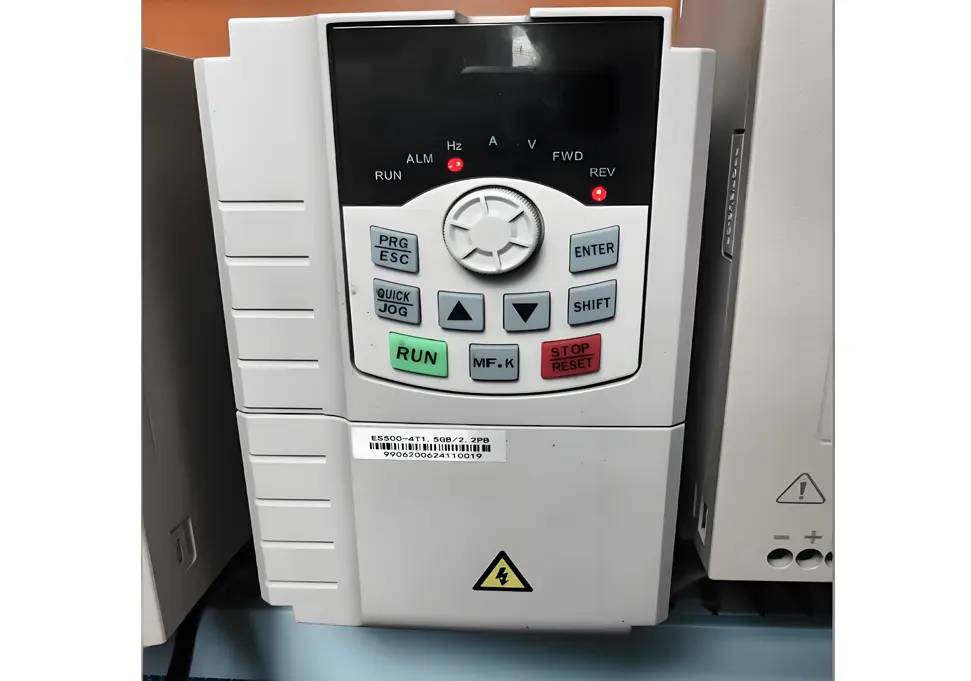
VFD Overheat Protection (OH) Troubleshooting Guide: How to Fix and Prevent What Does VFD OH Alarm Mean? When your Variable Frequency Drive (VFD) displays an “OH” or “OH1/OH2” error code, it indicates an Overheat Protection fault. This critical safety feature activates when internal temperatures exceed safe operating limits, automatically shutting down the drive to prevent component damage. Common Causes of VFD Overheating Issues 1. Environmental Factors High ambient temperature: Operating above recommended range (-5°C to +40°C) Inadequate ventilation: Poor air circulation in installation area Direct sunlight exposure: Equipment placed in unshaded locations Proximity to heat sources: Nearby machinery generating excessive heat 2. Cooling System Failures Malfunctioning cooling fan: Fan not working or running at reduced speed Clogged air pathways: Heat sinks blocked by dust, debris, or fibers Dirty heat exchangers: Accumulated dirt reducing thermal transfer efficiency 3. Electrical Load Problems Continuous overload conditions: Drive operating beyond rated capacity Oversized motor for drive: “Small drive, big motor” mismatch Motor defects: Short circuits, ground faults, or bearing failures causing high current 4. Internal Component Issues Faulty temperature sensors: Damaged thermistors or thermocouples IGBT module overheating: Power semiconductor failures Aging capacitors: Deteriorated components increasing heat generation 5. Programming Errors Excessively high carrier frequency: Increasing switching losses Incorrect thermal settings: Protection thresholds set too low Improper V/F curve configuration: Causing motor inefficiency and heating Step-by-Step Troubleshooting Procedure Immediate Response Actions Emergency shutdown: Stop VFD operation immediately upon OH alarm detection Power isolation: Turn off main power supply to ensure safety Cooling period: Allow equipment to cool naturally for 30-60 minutes Documentation: Record operating parameters at failure (frequency, current, voltage) Environmental Assessment Temperature verification: Measure ambient temperature to ensure it’s within -5°C to +40°C Ventilation evaluation: Check for adequate air flow around the equipment Heat source identification: Locate and isolate nearby heat-generating equipment Sunlight protection:...
Details
10/30/2025
Frequency Inverter Under Voltage Protection (LU) Troubleshooting Guide Meta Description: Comprehensive guide to diagnose and fix frequency inverter under voltage protection (LU) faults. Learn common causes, step-by-step troubleshooting, and preventive maintenance tips. Understanding LU Faults What is an LU Fault? LU Fault Definition: When a frequency inverter displays the “LU” fault code, it indicates an Under Voltage Protection event. This means the inverter has detected that either the input power voltage or the internal DC bus voltage has dropped below the factory-set or user-configured protection threshold. Key Characteristics of LU Faults Startup Issues: Inverter fails to start normally or trips immediately after power-on Operational Interruptions: Sudden shutdown during normal operation Visual Indications: Display panel shows “LU” or similar under voltage warning Audible Alarms: May be accompanied by warning beeps or indicator light flashes Protection Mechanism Explained The under voltage protection system activates when the DC bus voltage falls below 70% to 80% of the rated voltage. This protective measure: Blocks inverter pulse output to prevent damage to power components Shuts down the drive in a controlled manner Logs the fault for diagnostic purposes Prevents catastrophic failures of expensive components Common Causes of Under Voltage Protection 1. Power Supply Issues Grid Voltage Problems Chronic Low Voltage: Grid voltage consistently below 10% of rated value Transient Voltage Dips: Temporary voltage drops due to load changes Three-Phase Imbalance: Voltage differences between phases exceeding 5% Phase Loss: Complete or partial loss of one phase in three-phase systems Wiring and Connection Problems Loose Terminals: Input terminal screws not properly tightened Oxidized Connections: Corrosion at terminal points causing increased resistance Undersized Cables: Cable cross-sectional area insufficient for current requirements Damaged Conductors: Insulation breakdown or physical damage to power cables Switchgear Failures Contactor Issues: Pitted or worn contacts causing voltage drops Circuit Breaker Problems: Tripped breakers or...
Details
10/29/2025
Frequency Inverter Overvoltage Trip (OV Fault) Troubleshooting Guide Overvoltage trip (OV fault) is one of the most common faults in frequency inverters, triggered when the DC bus voltage exceeds the safety threshold (typically 800V). Below is a comprehensive troubleshooting guide to help you resolve this issue effectively. Fault Cause Analysis Common Causes: Excessively short deceleration time (typically < 3 seconds) Motor operates in generating mode, energy cannot be consumed in time Excess energy causes DC bus voltage to rise Grid voltage fluctuations Input voltage exceeds ±15% of rated value Voltage surge caused by external factors such as lightning strikes Regenerative braking energy Frequent braking generates large amounts of regenerative energy Brake resistor aging or improper selection Incorrect parameter settings Overvoltage protection threshold set too low Inappropriate deceleration time parameter configuration Step-by-Step Troubleshooting Process Step 1: Emergency Response Immediate shutdown: Stop the equipment immediately and disconnect power supply Fault documentation: Record the exact fault code and operating conditions Voltage verification: Check if grid voltage is within normal range Step 2: Systematic Diagnosis Power Supply Assessment ① Measure grid input voltage (normal range: 380V±15%) ② Check power supply stability and identify any fluctuations ③ Verify if simultaneous starting/stopping of other equipment causes interference Parameter Configuration Check Deceleration time: Extend to appropriate range (10-30 seconds) Overvoltage protection: Adjust threshold to reasonable levels Braking parameters: Verify brake resistor configuration settings Hardware Inspection Brake resistor: Check for signs of aging, damage, or overheating Capacitor bank: Inspect DC bus capacitors for bulging or leakage Connection terminals: Ensure all electrical connections are tight and secure Step 3: Resolution Strategies For Excessive Deceleration Issues: Extend deceleration time parameters appropriately Enable “deceleration overvoltage stall prevention” function Implement S-curve deceleration profile for smoother operation For Grid-related Problems: Install voltage stabilizer or line reactor Implement surge protection devices Adjust overvoltage protection thresholds...
Details
10/29/2025
Frequency Inverter Overcurrent Trip (OC Fault) Troubleshooting Guide Overcurrent trip (OC fault) is the most common type of frequency inverter failure, typically accounting for over 40% of all inverter faults. Below is a comprehensive troubleshooting guide to help you resolve this issue effectively. Fault Cause Analysis Common Causes: Instantaneous overload: Sudden increase in motor load due to mechanical jamming or transmission mechanism failure Inadequate acceleration time: Excessively short acceleration periods generate damaging inrush currents Output short circuit: Damaged cable insulation or incorrect wiring connections Motor malfunction: Short-circuited windings or damaged bearings in the motor Incorrect parameter configuration: Improperly set protection parameters Step-by-Step Troubleshooting Process Step 1: Emergency Response Immediate shutdown: Stop the equipment immediately and disconnect power supply Safety waiting period: Allow 5 minutes for capacitors to discharge completely Fault documentation: Record the exact fault code and operating conditions Visual inspection: Check for burning odors, smoke, or unusual noises Step 2: Systematic Diagnosis Load Inspection Protocol 1. Disconnect motor load and perform no-load test on inverter 2. If no-load operation is normal, the issue is load-related 3. Inspect mechanical transmission system for jamming or resistance 4. Measure motor winding insulation resistance (minimum 5MΩ required) Electrical System Check Cable assessment: Thoroughly inspect output cables for insulation damage Connection verification: Ensure all terminal connections are tight and secure Current measurement: Use a clamp ammeter to monitor actual operating currents Insulation testing: Verify proper insulation resistance levels Parameter Configuration Review Acceleration settings: Adjust to appropriate levels (10-15 seconds for heavy equipment) Overload protection: Configure correct protection curves and thresholds Motor parameters: Validate accurate motor nameplate data entry Step 3: Resolution Strategies For Overload Conditions: Reduce mechanical load or upgrade to higher capacity inverter Implement S-curve acceleration/deceleration profiles Extend acceleration time settings appropriately Verify proper ventilation and cooling For Short Circuit Issues: Replace damaged...
Details
10/29/2025
Inverter Capacity Selection Guide: When to Upgrade Your VFD Size Introduction Proper inverter capacity selection is crucial for the reliable and efficient operation of variable frequency drive (VFD) systems in industrial automation. Choosing the right size ensures optimal performance, extends equipment lifespan, and prevents costly downtime. This comprehensive guide will help you understand when to increase inverter capacity, how to calculate the correct size, and avoid common pitfalls in the selection process. Key Insight: Inverter capacity should be selected based on motor current requirements rather than just power rating, as this ensures the drive can handle the actual electrical demands of the application. Theoretical Basis for Inverter Capacity Selection Basic Calculation Formulas Inverter Rated Current Selection I_inv ≥ K × I_motor Where: I_inv: Inverter rated current (A) I_motor: Motor rated current (A) K: Safety factor (1.1-1.5 depending on load characteristics) Inverter Rated Power Selection P_inv ≥ K × P_motor × (η_motor × cosφ_motor) / (η_inv × cosφ_inv) Where: P_inv: Inverter rated power (kW) P_motor: Motor rated power (kW) η: Efficiency coefficient cosφ: Power factor Key Parameters for Capacity Selection Parameter Description Impact on Capacity Selection Motor Rated Current Rated current value on motor nameplate Directly determines the minimum current rating of the inverter Starting Current Multiple Ratio of maximum starting current to rated current Affects the required overload capacity of the inverter Load Moment of Inertia J = GD²/4g (kg·m²) Loads with large inertia require larger capacity inverters Acceleration Time Time from 0 to rated speed Short acceleration time requires larger capacity Scenarios Requiring Increased Inverter Capacity Classification by Load Type Constant Torque Loads (Capacity Increase Required) Typical Applications: Conveyors, mixers, extruders, elevators Characteristics: T ∝ P/n = constant Capacity Factor: K = 1.2-1.5 Reason: Constant torque across the entire speed range, high current at low speeds Square Law Torque Loads (Capacity Can Be Appropriately Reduced) Typical...
Details
10/28/2025
In-depth Comparative Analysis of Inverter Drive vs. Mains Frequency Motor Drive 1. Technical Principles and Voltage Characteristics: Core Root of Essential Differences 1.1 Voltage Waveform and Harmonic Characteristics (Core Distinction) Mains Frequency Drive: The power supply is a standard sine wave (50Hz/60Hz) that contains only fundamental frequency components. The waveform is continuous and smooth, with a low voltage rise rate (dv/dt, typically <100V/μs), and there are no harmonic pollution issues. The motor windings withstand gentle voltage changes, and the insulation system bears uniform stress. Inverter Drive: The output is a Pulse Width Modulation (PWM) pulse wave. It inverts DC voltage into a “quasi-sine wave” through high-frequency switching (carrier frequency: 2kHz-15kHz), which is essentially a superposition of numerous high-frequency square waves. Its core issues include: Abundant High-Order Harmonics: It contains (2u+1)-order harmonics (where u = modulation ratio), dominated by high-order harmonics at multiples of the carrier frequency. This increases the motor’s stator copper loss and rotor copper (aluminum) loss by 30%-50%. Voltage Spike Impact: When the cable impedance does not match the motor impedance, pulse wave reflection and superposition form voltage spikes. The peak value can reach 3 times the input voltage (e.g., over 1100V for a 380V input), causing high-frequency impact on the inter-turn insulation of windings. Electromagnetic Compatibility (EMC): Harmonics interfere with the power grid and surrounding electronic equipment through conduction and radiation, so additional input filters and reactors are required to suppress interference. 1.2 Speed Regulation Mechanism: From “Fixed Speed” to “Stepless Speed Adjustment” Mains Frequency Drive: Speed is determined by the motor’s pole pair number (formula: n=60f/p, where f = power frequency and p = pole pair number). Stepped speed regulation can only be achieved by changing the pole pair number (e.g., converting 4 poles to 6 poles), with a coarse speed adjustment step (typically ≥30% speed...
Details
10/28/2025
Comprehensive Guide: Pump Maintenance & Protection in High-Temperature High-Humidity Industrial Settings High-temperature (≥35℃) and high-humidity (relative humidity ≥80%) environments—such as industrial workshops, tropical outdoor sites, chemical plants, and wastewater treatment facilities—pose unique risks to pump operation. These conditions accelerate motor insulation aging, seal degradation, corrosion, and lubrication failure, leading to a 30-50% higher failure rate compared to normal environments. Below is a comprehensive guide to ensure safe, efficient, and long-lasting pump operation. 1. Motor Protection: Core of Safe Operation in Extreme Environments 1.1 Heat Dissipation Optimization (Top Priority for Overheating Prevention) Clean Heat Dissipation Components Regularly: Remove dust, oil, and debris from motor cooling fins, fan covers, and air inlets weekly. Blocked heat sinks can increase motor temperature by 15-25℃, leading to winding burnout. Use compressed air (pressure ≤0.4MPa) for cleaning to avoid damaging the fins. Enhance Ambient Ventilation: Install axial flow fans (air volume ≥1000m³/h) or exhaust systems in enclosed spaces (e.g., pump rooms) to maintain air circulation. For outdoor pumps, build sunshades with heat-insulating materials (e.g., fiberglass) to avoid direct sunlight, which reduces the motor surface temperature by 8-12℃. Frequency Converter Temperature Protection: If using a variable frequency drive (VFD) for speed regulation, set the over-temperature protection threshold to ≤85℃ (motor winding temperature) and enable automatic shutdown when exceeded. Ensure the VFD itself is equipped with a cooling fan and clean its air filter monthly. Avoid Overload Operation: High temperatures reduce water viscosity, which may increase pump flow and current. Monitor the operating current with a clamp meter—ensure it does not exceed 110% of the rated current. Install a thermal overload relay (setting: 1.1-1.2×rated current) for additional protection. 1.2 Insulation & Moisture Proofing (Prevent Short Circuits) Select High-Protection-Grade Motors: Choose motors with an IP55 or IP65 protection rating (IP65 is recommended for heavy humidity). IP55 prevents dust ingress and low-pressure water jets,...
Details